
Module 3
# Sparse vs Dense vs Hybrid Search
Understand dense versus sparse retrieval, their strengths, and how a hybrid approach can combine them.
## Today's path
1. Where We Left Off
2. The Two Families of Search
3. Filtering: Works with Any Retrieval Method
4. Hybrid Search: Dense + Sparse
5. Setting Up Hybrid Search in Qdrant
6. Fusion Strategies
7. Beyond Text: Multimodal Search
8. References & Further Reading
By the end, you'll understand when to use dense, sparse, or hybrid search and how to implement them in Qdrant.
## 1. Where We Left Off
In Module 2, you built a complete ingestion and retrieval pipeline: raw text → vector → store → top-K query. Dense-only retrieval is best for semantic and contextual search. It struggles on precise product names and model numbers.
| Query | iPhone 15 |
|-------|-----------|
| **The user wants exactly this product. No synonyms. No paraphrasing.** | |
**Dense search returns:**
| iPhone 14 | (0.93) | ← wrong model |
|----------|--------|---------|
| iPhone 15 Pro Max | (0.91) | ← wrong model |
| iPhone 15 | (0.89) | ← correct |
### The problem
Dense search understands meaning - but that's exactly wrong here. "iPhone 14", "iPhone 15", and "iPhone 15 Pro Max" are close together in embedding space because they're about the same product line - but a shopper searching for one wants that exact model, not its closest semantic neighbor. IDs, codes, and specific model names need exact matching, not semantic neighborhood. This is the gap sparse search fills.
## 2. The Two Families of Search
Every retrieval system is built from one or both of these families. Understanding what each does - and what it cannot do - is the foundation of production search design.
### Dense Search (Semantic)
Dense vectors are embeddings: fixed-length lists of floating-point numbers that encode meaning. Two pieces of text with similar meaning produce vectors that are close in high-dimensional space, regardless of whether they share any words.
```python
# Dense vector: all dimensions have non-zero values
dense_vector = [0.12, -0.87, 0.33, 0.05, -0.42, ...] # 384 dims
# Semantically close, even without shared words:
encode("car repair") ≈ encode("automobile maintenance")
encode("cheap flights") ≈ encode("affordable airfare")
```
### Sparse Search (Keyword-Based)
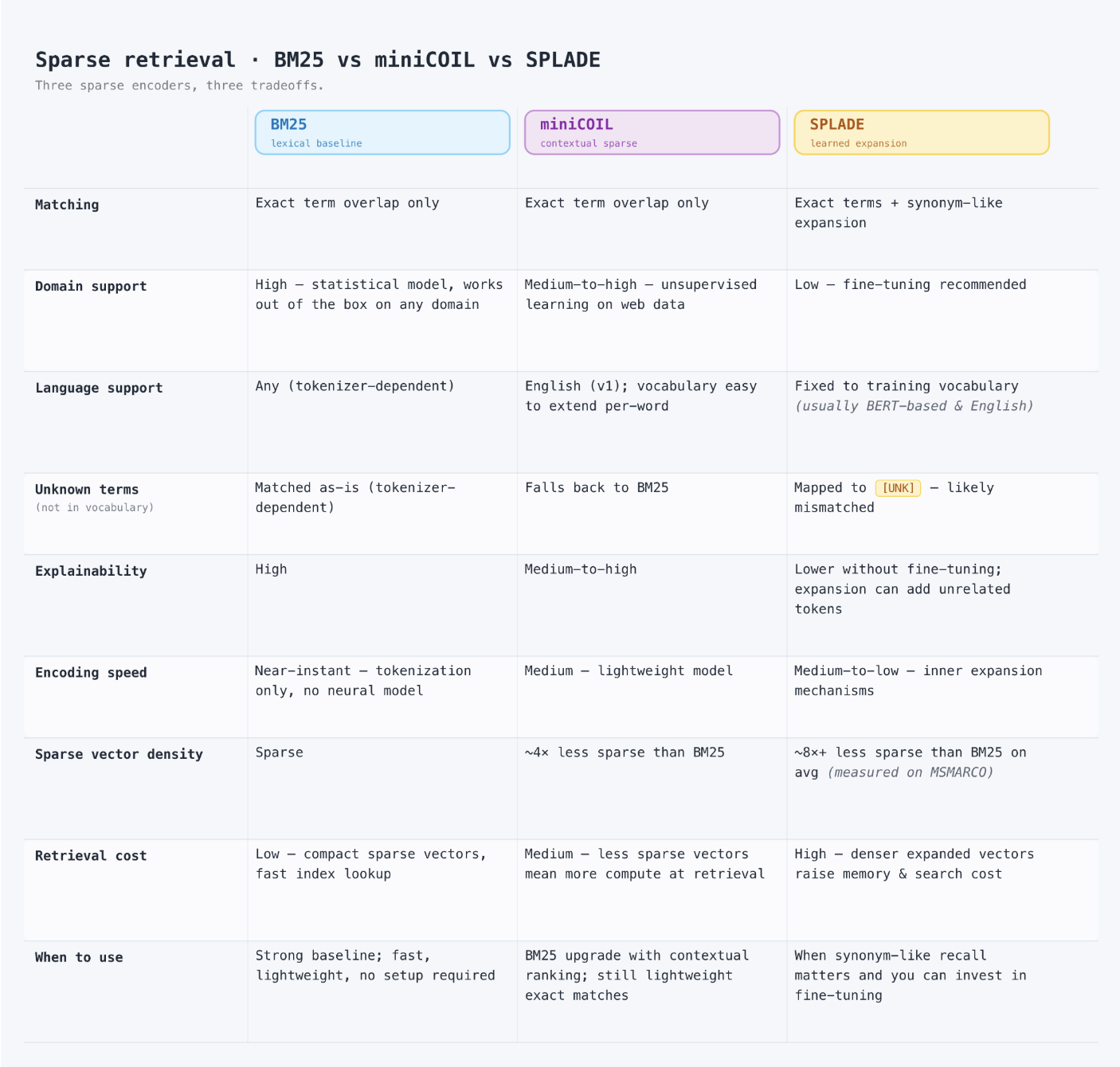
Sparse vectors are token-based. Only the dimensions corresponding to tokens that actually appear in the text have non-zero values - everything else is zero. BM25, SPLADE, and miniCOIL are the most common ways to produce them.
#### How Sparse Vectors Are Encoded
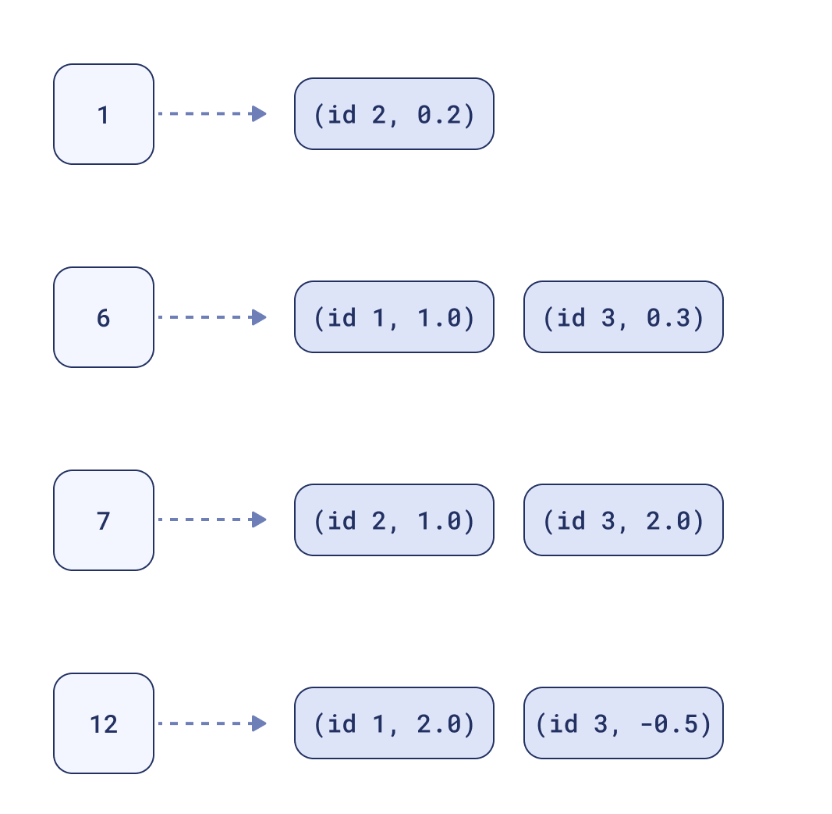
A dense vector has a small, fixed number of dimensions (e.g. 384), and every single one holds a value. A sparse vector works the opposite way: it has one dimension per token in the vocabulary - often tens of thousands - but a given piece of text only ever activates the handful of tokens it actually contains. Everything else is implicitly zero.
Storing tens of thousands of mostly-zero numbers per point would be wasteful, so sparse vectors are represented as two parallel arrays instead: the `indices` of the non-zero dimensions, and the `values` at those positions. Nothing is stored for the dimensions that are zero.
```python
# Sparse vector: most values are zero
# Only the indices of present tokens are stored - not the full vocabulary
sparse_vector = {
"indices": [142, 9325, 44001], # token IDs: 'nike', 'pegasus', '40'
"values": [2.3, 1.2, 0.8], # weight for each token
}
# Exact match: 'SKU-48291' only matches the document
# that contains those exact characters.
```
#### Sparse Models: BM25, SPLADE, and miniCOIL
Different sparse models decide *which* tokens get weight and *how much*:
| Model | How it assigns weights | Notes |
|-------|-------------------------|-------|
| BM25 | Statistical - term frequency and inverse document frequency (IDF), no training involved | Classic, fast, fully interpretable. Only scores tokens exactly as written. Qdrant's default sparse model (`Qdrant/bm25`). |
| SPLADE | Neural - a transformer learns to expand a text with related terms and assign them weights, even terms not in the original text | Captures some synonymy while staying sparse. More compute-intensive than BM25. |
| miniCOIL | Neural, contextualized term weighting - keeps BM25's exact-token vocabulary but weights each occurrence using its surrounding context | Adds context-awareness to exact-match retrieval without the cost of full expansion models like SPLADE. |
Start with BM25 for interpretable, exact-match retrieval. Reach for SPLADE or miniCOIL when you need sparse retrieval to be more forgiving of related wording, at some extra compute cost.
#### Indexing Sparse Vectors
Because the vast majority of dimensions are zero, comparing full vectors would waste effort scanning entries that don't matter. Qdrant indexes sparse vectors with a data structure similar to the **inverted index** used by text search engines: for every token, it keeps a posting list of every point where that token has a non-zero weight.
```
Token "nike" → posting list: [point_1, point_5, point_42, ...]
Token "pegasus" → posting list: [point_1, point_5, point_88, ...]
```
A query only walks the posting lists for tokens it actually contains, skipping every point that shares none of them. Unlike HNSW (Module 2), which is an approximate index, Qdrant's sparse index is exact - no accuracy is traded away for speed.
### Head-to-Head Comparison
| | Dense Search (Semantic) | Sparse Search (Keyword) |
|---|---|---|
| **✔ Strengths** | Synonyms - car = automobile
Paraphrasing - "cheap flights" ≈ "affordable airfare"
Multilingual queries across languages
Intent and context understanding | Exact token matches - IDs, codes, SKUs
Rare or domain-specific terms
Interpretable - easy to debug and explain |
| **✖ Weaknesses** | Exact IDs like SKU-48291 can drift
Rare or invented tokens
Precise code / serial number matching | Synonyms - car ≠ automobile
Paraphrasing and rewordings
Cross-language queries |
### Key insight
Dense = meaning. Sparse = exact matching. Neither is complete alone. Every real-world query contains both semantic intent (what the user means) and exact constraints (what the user needs precisely). You need both.
## 3. Filtering: Works with Any Retrieval Method
Payload filters are not a hybrid-only feature. The same `query_filter` applies whether you're running dense-only, sparse-only, or hybrid retrieval - it's evaluated as a hard constraint during the search itself, not as a separate step afterward.
### Filtering a Dense Query
```python
from qdrant_client.models import Filter, FieldCondition, MatchValue
results = client.query_points(
collection_name="products",
query=dense_query_vector,
using="dense",
query_filter=Filter(
must=[FieldCondition(key="in_stock", match=MatchValue(value=True))]
),
limit=5,
)
```
### Filtering a Sparse Query
```python
results = client.query_points(
collection_name="products",
query=sparse_query_vector,
using="sparse",
query_filter=Filter(
must=[FieldCondition(key="in_stock", match=MatchValue(value=True))]
),
limit=5,
)
```
### Filtering a Hybrid Query
The identical `query_filter` parameter also applies when fusing dense and sparse prefetches together - see Section 5 for a full hybrid example with filters attached.
### Why it matters
Because filters are applied during the search rather than after it, out-of-scope points never take up a slot in your top-K results - regardless of whether the underlying retrieval is dense, sparse, or hybrid. This keeps results both relevant and valid: in stock, within permissions, within a date range.
## 4. Hybrid Search: Dense + Sparse
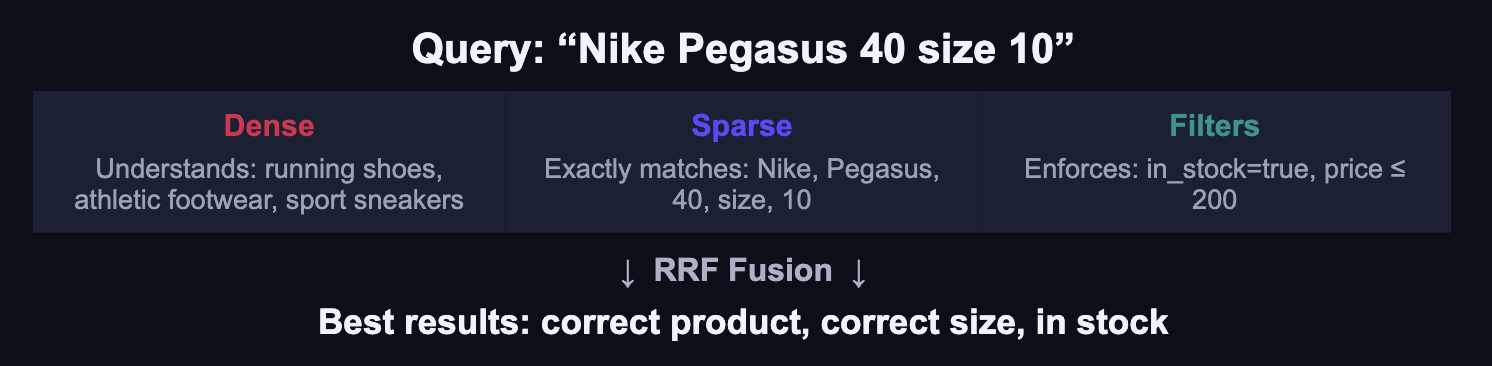
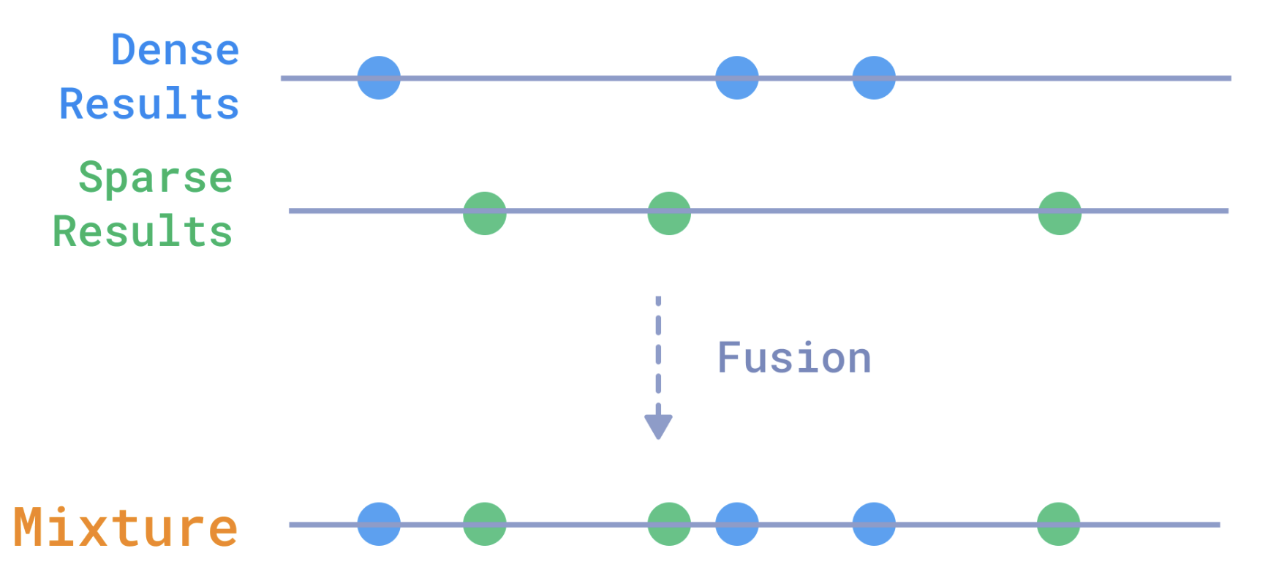
Hybrid search runs dense and sparse retrieval simultaneously, then fuses the ranked candidate lists into a single result set. The result: semantic understanding with exact-match precision. Filters (Section 3) can be layered on top of any of this.
### A Concrete Example
### RRF Fusion
You can learn more about fusion in the [Hybrid Queries documentation](https://qdrant.tech/documentation/search/hybrid-queries/#reciprocal-rank-fusion-rrf).
## 5. Setting Up Hybrid Search in Qdrant
Hybrid search in Qdrant uses named vectors - dense and sparse stored together on the same point - and the Universal Query API to prefetch from each, then fuse the results.
### Step 1 - Create a Hybrid Collection
Declare both a dense vector config and a sparse vector config on the same collection. Points will carry both.
```python
from qdrant_client import QdrantClient, models
client = QdrantClient(":memory:")
client.create_collection(
collection_name="products",
vectors_config={
"dense": models.VectorParams(
size=384,
distance=models.Distance.COSINE,
),
},
sparse_vectors_config={
"sparse": models.SparseVectorParams(),
},
)
```
### Step 2 - Insert Points with Both Vectors
Each point carries a dense embedding and a sparse vector. Pass a models.Document object and specify the model - Qdrant handles embedding on the server side.
```python
client.upload_points(
collection_name="products",
points=[
models.PointStruct(
id=1,
vector={
"dense": models.Document(
text="Nike Pegasus running shoes",
model="sentence-transformers/all-MiniLM-L6-v2",
),
"sparse": models.Document(
text="Nike Pegasus running shoes",
model="Qdrant/bm25",
),
},
payload={"price": 120, "in_stock": True, "size": [9, 10, 11]},
)
],
)
```
### Step 3 - Hybrid Query with Fusion
Prefetch from both the dense and sparse indexes simultaneously, then fuse the two ranked lists with RRF into a single result.
```python
from qdrant_client.models import Filter, FieldCondition, MatchValue
results = client.query_points(
collection_name="products",
prefetch=[
models.Prefetch(
query=models.Document(
text="Nike Pegasus 40 size 10",
model="sentence-transformers/all-MiniLM-L6-v2",
),
using="dense",
limit=20,
),
models.Prefetch(
query=models.Document(
text="Nike Pegasus 40 size 10",
model="Qdrant/bm25",
),
using="sparse",
limit=20,
),
],
query=models.FusionQuery(fusion=models.Fusion.RRF),
query_filter=Filter(
must=[FieldCondition(key="in_stock", match=MatchValue(value=True))]
),
limit=5,
)
```
### How it works
Both prefetch calls run in parallel. Each returns 20 candidates. RRF fusion merges the two ranked lists based on position (not score), then the final limit=5 takes the top results. The filter applies throughout - out-of-stock products never enter the candidate set.
## 6. Fusion Strategies
Once both retrievers return their candidate sets, a fusion algorithm merges them into a single ranked list. Qdrant supports two strategies:
| Strategy | How it works | When to use it |
|----------|--------------|----------------|
| RRF (Reciprocal Rank Fusion) | Combines rankings only - ignores raw score values. Robust, hard to game. | Default for most cases. Safe starting point when score scales differ between dense and sparse. |
| DBSF (Distribution-Based Score Fusion) | Normalizes score distributions before merging. Sensitive to relative score differences. | Better when score gaps meaningfully encode relevance and both retrievers are well-calibrated. |
You can learn more about fusion in the [Hybrid Queries documentation](https://qdrant.tech/documentation/search/hybrid-queries/#reciprocal-rank-fusion-rrf).
### Starting point
Start with RRF. It's the safer default because dense and sparse scores are on different scales - raw score fusion without normalization produces unreliable results. Switch to DBSF only after evaluating on a labeled test set.
## 7. Beyond Text: Multimodal Search
The same primitive - embed data, store as a vector, search by similarity - applies to any modality. Qdrant stores whatever vectors your embedding model produces. The retrieval mechanics are identical.
- **Images**
"red dress" → visually similar products
CLIP, SigLIP embed images and text into the same space
- **Video**
"factory fire" → matching video scenes
Frames are sampled, embedded, stored as named vectors
- **Audio**
Hum a melody → matching songs
Audio fingerprints or spectrogram embeddings
- **Text**
"cheap flights NYC" → semantic docs
Sentence transformers, OpenAI embeddings, etc.
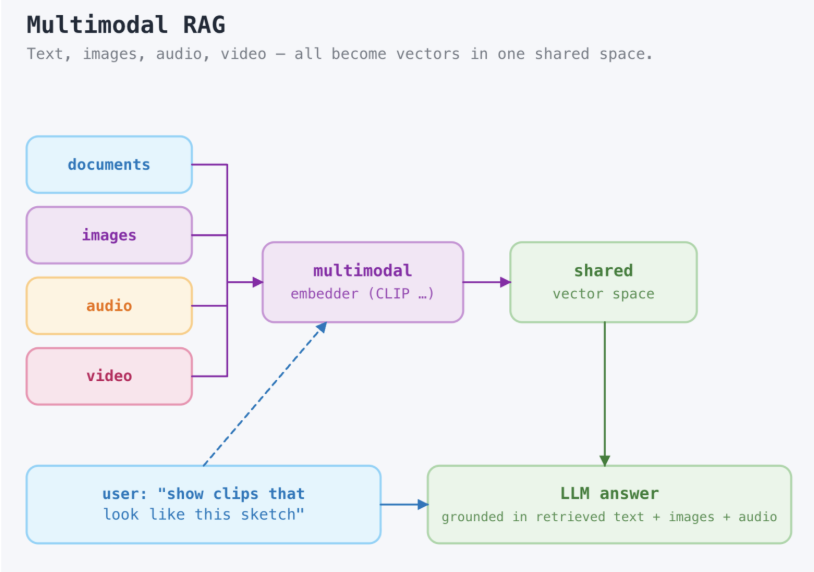
### The Unifying Principle
**Data → Embedding Model → Vector → Qdrant**
The modality changes. The system does not.
### Named Vectors for Multimodal
When text and images must be searchable together, store them as named vectors on the same point. A query against one named vector retrieves across both.
```python
# A product point with both text and image embeddings
models.PointStruct(
id=42,
vector={
"text": text_model.encode("Red Nike running shoe").tolist(),
"image": clip_model.encode_image(product_image).tolist(),
},
payload={"sku": "NK-RED-10", "price": 120},
)
# Query by image: find visually similar products
client.query_points(
collection_name="products",
query=clip_model.encode_image(query_image).tolist(),
using="image",
limit=10,
)
```
## 8. References & Further Reading
- **Sparse Retrieval Demo** - [Demo: Keyword Search with Sparse Vectors - Qdrant](https://qdrant.tech/documentation/tutorials/sparse_search/)
- Live comparison of BM25, SPLADE, and dense embeddings on the same queries.
- **Hybrid Queries (RRF + DBSF)** - [Hybrid Queries - Qdrant](https://qdrant.tech/documentation/concepts/hybrid_query/)
- Full reference for prefetch, FusionQuery, RRF, and DBSF in the Qdrant API.
- **Sparse Vectors Reference** - [Vectors - Qdrant](https://qdrant.tech/documentation/concepts/vectors/#sparse-vectors)
- SparseVectorParams, index configuration, and storage options.
- **Sparse Vector Indexing** - [Indexing - Qdrant](https://qdrant.tech/documentation/manage-data/indexing/#sparse-vector-index)
- How Qdrant's inverted-index-style sparse index works, and when it rebuilds into an immutable index.
- **Working with miniCOIL** - [FastEmbed: miniCOIL - Qdrant](https://qdrant.tech/documentation/fastembed/fastembed-minicoil/)
- How miniCOIL's contextualized term weighting works, and how to use it via FastEmbed.
- **Multimodal Search Tutorial** - [Multimodal and Multilingual RAG with LlamaIndex and Qdrant](https://qdrant.tech/documentation/tutorials/multimodal_rag/)
- Text + image search with embeddings and named vectors.
- **Named Vectors** - [Collections - Qdrant](https://qdrant.tech/documentation/concepts/collections/#multiple-vectors)
- How to configure and query multiple named vectors on the same point.
## What's Next - Module 4
Next, we'll explore:
- Production patterns: multi-tenancy, agent memory, and RAG pipelines
- Deployment options: Cloud, Hybrid Cloud, Edge, and self-hosted
- Formula queries - when RRF and DBSF aren't enough
- etc..
End of Module 3. Continue to Module 4: Customer Use Cases and Production Architecture.